


Controls
If
you think of the Commedia as a virtual puppet-theatre, this page shows
you what strings to pull and how to recognize them on screen. Here you
will find technical information on how to control the stage and your character.
With these simple instructions and a bit of imagination you will be able
to make the Captain sprout stories of his campaigns against the savage
Turk while flapping his arms like a madman or make the noble Isabelle
whisper sweet temptations behind her fan. But first a few words on how
to get onto the stage in the first place.
If you want to view the characters gestures,
go here.
Actual tips on digital improvisation can be found on the rules
page.
Pre-Stage and Backstage Control Basics...
Let us begin with a short briefing on how to log onto the Commedia server and put on a performance. Let's assume you've downloaded the Commedia application from here.
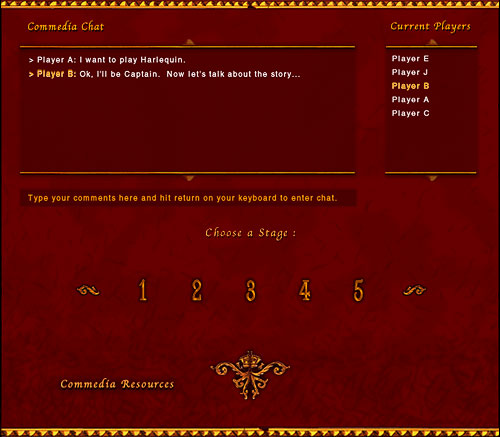
1.
Log on to the commedia server by entering your stage name and pressing
Enter Backstage. Be sure your fellow troupe members know your stage-name.
2. In the backstage area,
find your troupe-mates on the chat and choose a stage to perform on by
pressing that stage number. You may also want to chat to other performers
in the backstage area.
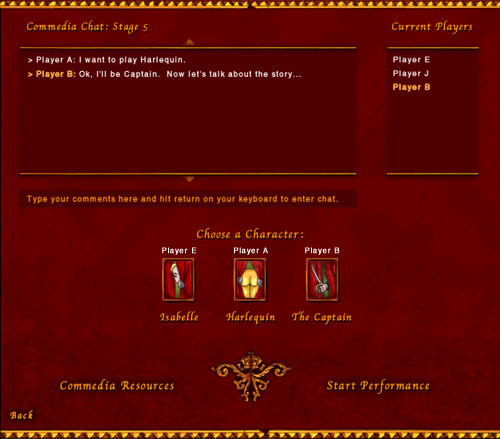
3.
In the numbered backstage area, chat with fellow troupe members. If you
end up in the wrong stage, just press the back-button in the left bottom
corner to return to the main backstage area.
4.
Choose
your Mask by clicking on the icons. They'll display your stage name when
selected. To deselect a Mask, just klick it again.
5. When all troupe members
are ready, press the start performance button and you will be transported
to the stage, behind the thick velvet curtain. The audience is getting
restless. It's time to start the Commedia.
Stage Controls
The
Stage is where it all happens. As a one of the three Masks you move across
the stage, using elegant gestures and words to play out the Scenario you
have chosen. The basic interface is simple. You control the gestures,
movement and facing of your Mask by klicking on the icons below the stage.
To speak a line, enter it on the keyboard and press enter.
There are quite a number of functions available to you on the Stage, some
of them controlling stage machinery rather than a Mask. This diagram of
the stage should make things considerably clearer. An number-by-number
explanation is given below.
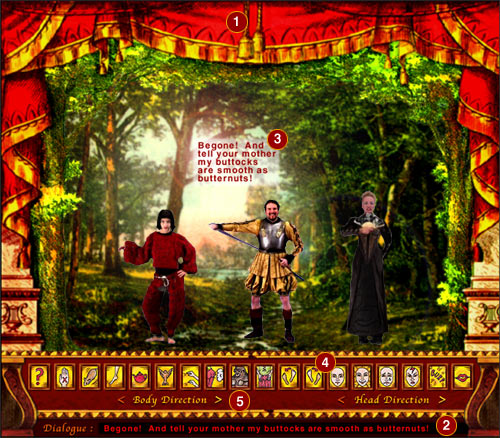
1.
Pull these tassles by dragging them down with the cursor to open and close
the curtains. The left tassle is used to open the curtain at the beginning
of a play, the right tassle closes curtain and ends the performacve. The
screen fades and the players are transported back to the main backstage.
Pulling on these prematurely may make you very unpopular with your Troupe-fellows.
More on how to end performances in the How
to Play section.
2.
Enter your dialogue in this field here. The amount you can say at any
one time will be constrained to the length of the text field itself. This
is intentional. A long speech is better divided into smaller chunks to
give the other actors a chance to respond or interject.
3.
This is where your lines will appear. Little
white speech boxes centered abive your character's head. They'll follow
you around as you move about.
4.
Gesture and Facial Expression icons.
These are the puppet-strings. When you click one of these your Mask immediatly
carries out the action corresponding to the icon. The icon lights up in
red while the Mask is performing the gesture. You may interrupt a gesture
at any time by klicking on an icon. Klicking the same icon will make the
gesture start over. Read more about gestures and how to use them here.
5.
Body Direction and Head Direction.
These arrow-buttons changes the direction you are facing so that you can
actually appear to be talking to the other characters or to the audience.
Play around with them to get a feel for how they work.
